Securing a Server Cluster With ReportedIP
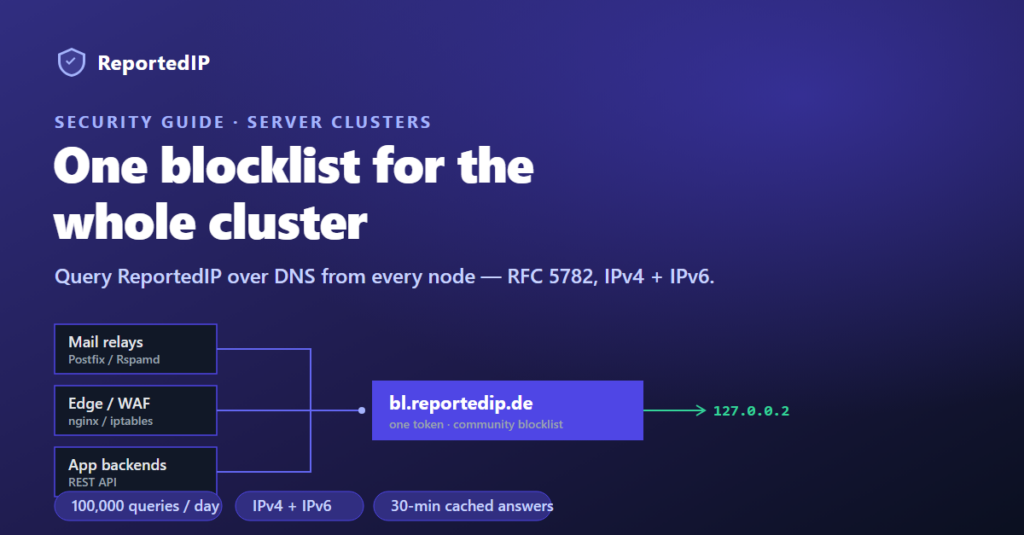
A server cluster multiplies your attack surface: every web node, mail relay, and edge proxy is probed independently, yet most setups give each node its own half-configured block rules. ReportedIP lets the whole cluster share one community threat feed — and with the DNS / RBL Zone every node can read it over plain DNS, with no per-node integration code.
The DNS / RBL Zone is a paid add-on on PRO and above. Subscribe from your dashboard, then point every node at one zone string.
Why a cluster needs one shared threat feed
When ten nodes each keep their own block list, an IP banned on node 1 still hits nodes 2 through 10 until each one learns about it independently. That gap is exactly where credential-stuffing and spam runs succeed — they rotate across your nodes faster than any single node updates its rules.
A shared feed closes the gap. ReportedIP scores IPs from a real-time community network (confidence ≥ 75 % before an address is listed, with a 48 h false-positive cool-down), and every node in your cluster reads the same answer. A new attacker reported anywhere in the network is blocked everywhere in your cluster within one cache cycle.
Query the blocklist over DNS from every node
The DNS / RBL Zone turns the community blacklist into a standard DNSBL at bl.reportedip.de. A node looks up the reversed client IP under your token and reads the answer — the same convention Spamhaus and every other DNSBL use, so any RBL-capable software works without custom code. It follows RFC 5782, covers IPv4 and IPv6 equally, and returns 127.0.0.x codes:
| Answer | Meaning | Action |
|---|---|---|
127.0.0.2 | Listed, high confidence (≥ 90) | Reject |
127.0.0.3 | Listed, medium confidence (75–89) | Reject or score |
NXDOMAIN | Clean | Accept |
127.255.255.251 | Daily quota reached | Add a token |
127.255.255.252 | Token invalid / inactive | Check billing |
One token across the whole cluster — usage is summed, not duplicated
You do not need a token per node. Point every mail relay at the same zone string. Each token includes 100,000 DNS queries per day, and usage is aggregated as the sum across all your nodes — node A serving 40,000 lookups and node B serving 35,000 counts as 75,000 against the one daily quota. Resolver caching keeps you well under it in practice: a listed answer is cached for 30 minutes and an NXDOMAIN for 5, so most repeat lookups never leave your network.
When a busy cluster does approach the limit, add a second token and split it across node groups — the quotas are independent. A per-token rate limit of roughly 50 queries per second guards against bursts; sustained spikes above it are answered with REFUSED.
Mail relays: one line in Postfix or Rspamd
On every MX and outbound relay in the cluster, add the zone to your restrictions. Postfix builds the reversed query for IPv4 and IPv6 senders automatically (2.6+):
# main.cf (same on every mail node)
smtpd_recipient_restrictions =
    permit_mynetworks,
    permit_sasl_authenticated,
    reject_rbl_client <your-token>.bl.reportedip.de=127.0.0.[2..3]

# keep the token out of bounces and logs:
rbl_reply_maps = texthash:/etc/postfix/rbl_reply
Rspamd users enable both address families and map the return codes to symbols:
# local.d/rbl.conf
rbls {
  reportedip {
    rbl = "<your-token>.bl.reportedip.de";
    ipv4 = true;
    ipv6 = true;
    returncodes {
      REPORTEDIP_HIGH   = "127.0.0.2";
      REPORTEDIP_MEDIUM = "127.0.0.3";
    }
  }
}
Full configuration, including the reject-reply override that keeps your token out of SMTP bounces, is in the DNS / RBL Zone docs. The token is a private credential — treat it like a password and rotate it from the dashboard if it leaks.
Category sub-zones for per-service filtering
Append a category slug to filter by threat type, so a node only blocks what is relevant to it. A login-heavy app tier can query the brute-force list; a mail tier can weight the spam list:
<reversed-ip>.<your-token>.brute-force.bl.reportedip.de
<reversed-ip>.<your-token>.spam.bl.reportedip.de
Slugs include spam, brute-force, cms-login, web-attacks, malware, ddos, fraud, infrastructure, and apt. A hit is returned only if the IP is listed in that category.
Edge and web nodes: the feed and the API
Not every tier speaks DNSBL. Reverse proxies, firewalls, and web servers are better served by the community blacklist feed — a refreshed text/JSON/CSV export you pull with one cron job and load into fail2ban, an iptables ipset, or an nginx deny map. Every edge node in the cluster runs the same cron and drops the same addresses.
For application and API backends that need a verdict at request time, the REST API returns a full confidence breakdown per IP (add verbose=true to see every scoring component). A free account covers 1,000 checks and 50 reports per day; bulk operations are available on Pro and above.
A reference layout for a three-tier cluster
| Cluster tier | How it reads the feed | ReportedIP product |
|---|---|---|
| MX / outbound mail relays | DNSBL lookup at SMTP connect time | DNS / RBL Zone |
| Reverse proxies / WAF / edge | Blocklist export into nginx / iptables / fail2ban | Blacklist Feed |
| App and API backends | Per-request score check | Public API |
| Decoy / honeypot nodes | Report attacker IPs back to the network | Honeypot Server |
Every tier reads from one community database, so an attacker caught by a honeypot node is blocked at your mail relays and edge proxies on the next cache cycle. Closing the loop — reporting back what your own nodes see — is what keeps the shared feed accurate for everyone.
What you need to get started
- Subscribe to the DNS / RBL Zone from your dashboard and copy the token.
- Add the one-line
reject_rbl_client(or Rspamdrblsblock) to every mail node — see the RBL docs. - Pull the blacklist feed on edge nodes; call the API from app backends.
- Read the launch announcement for the zone in DNS RBL Zone: query our blocklist from your mail server.
Frequently asked questions
Do I need a separate token for each server?
No. One token covers the whole cluster; the 100,000 daily queries are summed across every node that uses it. Add a second token only when a large cluster needs more headroom, then split it across node groups.
Does the DNS / RBL Zone work with IPv6 mail servers?
Yes. The zone follows RFC 5782 and answers IPv4 and IPv6 lookups equally. Postfix 2.6+ and Rspamd build the reversed query for either address family automatically — the same single directive covers both.
What happens if a node hits the daily quota?
Once the token’s combined daily total reaches its limit, the zone returns 127.255.255.251 and stops resolving until the next UTC midnight reset. Add another token to raise capacity. Because answers are cached for up to 30 minutes at each resolver, most clusters never approach the limit.