ReportedIP Hive 2.0.22 — Hide-Login Sensor, German UI & Calmer 2FA Login
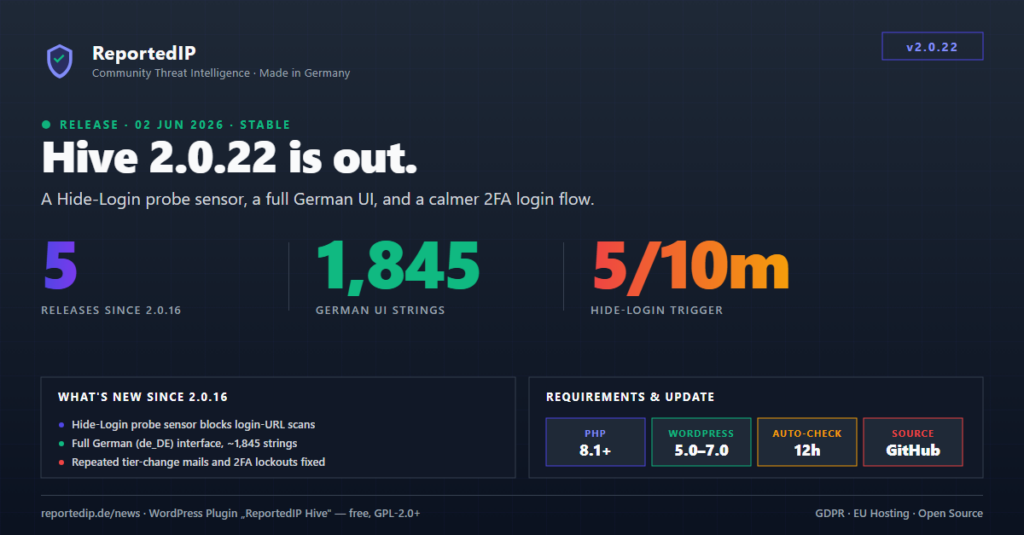
ReportedIP Hive 2.0.22 is the head of five releases shipped since 2.0.16: a new Hide-Login probe sensor, a complete German interface, and a 2FA login flow that no longer sends codes you did not ask for. All of it reaches existing sites through the built-in 12-hour update check.
This roundup covers everything between 2.0.17 and 2.0.22. Sites on auto-update get the head release within twelve hours; force a check via Dashboard → Updates to pull it now.
What is new in ReportedIP Hive 2.0.22 and the releases before it
The work splits into four threads: a new login-scan sensor, a calmer and more robust 2FA flow, a full German translation, and a set of email and stability fixes. Each version below is a real tagged release on GitHub.
- 2.0.17 — 2FA-enforcement lockouts stopped masquerading as “Invalid credentials”.
- 2.0.19 — German translation, a PHP 8 fatal-error fix on the 2FA settings tab, and a translation-freshness CI gate.
- 2.0.20 — no more repeated “plan is active” mails, leaner 2FA onboarding, and an end to unsolicited email/SMS codes.
- 2.0.21 — the Hide-Login probe sensor and a method picker that no longer truncates on narrow login cards.
- 2.0.22 — the 2FA challenge keeps your chosen method after a failed code instead of snapping back.
The Hide-Login probe sensor blocks scans of your old login URL
If you run Hive’s Hide Login feature, your real login page lives at a custom slug and /wp-login.php should never be hit by a legitimate visitor. Version 2.0.21 turns that into a detection signal: repeated direct hits on the old /wp-login.php from one IP are now treated as a scan, blocked on the same escalation ladder as the other sensors, and reported to the community.
A single accidental visit stays harmless — only the existing low-severity recon log fires. A pattern triggers the block. The sensor is tunable on the Login settings tab: a master toggle (on by default), a hit threshold (default 5) and a timeframe (default 10 minutes). Whitelisted IPs are never counted, so your own monitoring never trips it.
This complements the decoy bait-path detection covered in the 2.0.16 release notes: bait paths catch credential and backup-file probes, the Hide-Login sensor catches brute-force tools that still hammer the default login URL.
The 2FA login flow stops sending codes you never requested
Before 2.0.20, a user whose primary method was email or SMS got a one-time code the moment the challenge screen loaded — before they could even pick a method. Both delivery methods now start in their request phase: you select the method and click “Send code” before anything goes out. Stateless methods (authenticator app, passkey, recovery codes) are unaffected and show their input directly.
The practical effect: no unsolicited mail or SMS, and no burning the rate limit or the managed relay quota for a method the user did not choose. On a busy storefront login that quota matters — see how relay quotas and the 80% / 100% alert mails work in the 2.0.16 notes.
The challenge now keeps your method after a wrong code
Version 2.0.22 fixes a frustrating loop. With several methods configured, switching from Email to the SMS tab, requesting a code and submitting a wrong or expired one snapped the page straight back to the Email tab — the chosen method and the typed code both lost. The challenge handler now keeps the submitted method across a re-render (failed verify, soft lockout), so you stay on your tab, see the error and re-enter. The value is still validated against the account’s active methods, so a forged method falls back safely. Both the wp-login.php and the WooCommerce frontend flow are covered.
The method picker no longer truncates to “A…/E…/S…/W…”
Inside a narrow themed storefront login column the method tabs used to collapse to single-letter abbreviations. The selector now reacts to the actual card width through a CSS container query and stacks the methods as a vertical, full-label list when space is tight, so Authenticator, Email, SMS and WebAuthn stay readable.
Hive 2.0.19 ships a complete German interface
All user-facing strings — roughly 1,845 of them — are now translated into German (de_DE, formal “Sie”) and shipped as a compiled .po / .mo pair. Source strings stay English; WordPress loads the German translation automatically when the site language is German, so every other locale is unaffected.
To keep that translation honest, the same release added a freshness gate. composer i18n:check fails the build when the translation template is stale, the German file has untranslated or fuzzy entries, or the compiled binary is out of sync. It runs as a blocking CI job, so the German UI stays current with the source on every change. The release also bumped the tested-up-to header to WordPress 7.0.
Lockout, email and stability fixes
2FA lockouts no longer read as “Invalid credentials”
In 2.0.17, an enforced user who exhausted the 2FA onboarding skip quota saw the real reason — “Two-factor authentication required — skip quota exhausted, contact an administrator” — rewritten down to the generic “Invalid credentials.” by the user-enumeration login mask. That sent locked-out admins on a pointless password reset. The mask now passes 2FA messages through, because that block fires only after the password has validated, so surfacing the reason leaks nothing about whether the username exists. Genuine credential errors stay masked.
No more repeated “plan is active” mails
The tier-change welcome mail used to derive the previous tier from a five-minute status transient. Once that transient lapsed, the previous tier collapsed to “free”, so every subsequent refresh of a paid key re-detected a phantom free-to-paid transition and re-sent the mail. Version 2.0.20 moves the baseline into a durable option: the first observation seeds it silently and the mail fires only on a genuine tier flip. Verified live as zero firings across repeated refreshes of an active tier, exactly one firing on a real upgrade.
Smaller correctness fixes
- 2.0.19 — a
TypeErroron PHP 8 took down the 2FA settings tab and setup-wizard step when the enforce-roles or allowed-methods options were stored as an array. Reads now go through a format-tolerant helper. - 2.0.20 — the setup wizard silently dropped enforced-2FA roles whose slug was not lowercase (membership-plugin roles like
um_Premium-Member); it now preserves the slug, matching the settings tab. - 2.0.20 — admin notices were unstyled on non-plugin admin screens and the primary button lost its contrast inside a WordPress
.notice. A self-contained stylesheet now ships on every admin screen. - 2.0.20 — the guided 2FA onboarding wizard is now reachable directly from the recommendation banner and the profile 2FA section, and the wizard itself is leaner.
How to update to 2.0.22
- In-plugin auto-update. The Plugin Update Checker polls GitHub Releases every 12 hours. Force a check via Dashboard → Updates if you don’t want to wait.
- Manual download. Grab the ZIP from the v2.0.22 release on GitHub.
- WP-CLI.
wp plugin update reportedip-hiveif you manage WordPress from the command line.
For the previous release and the full version history, see the 2.0.16 release notes and the API and Plugin changelog. Setup, the Hide Login feature and 2FA configuration live in the WordPress plugin documentation.